Search Your Memory, Not Your Filenames
A local-only, personal photo library you can search in plain English — by what's in the photo, what it says, or when you took it — instead of by filename or manual tags.
- Project type
- Full-stack AI application (vision-grounded semantic search over a personal photo library)
- Role
- Solo direction and product decisions; implementation paired turn-by-turn with Claude Code (Sonnet 5)
- Created
- October 2026
- Status
- Working local system — upload, background captioning/OCR/embedding, and content- or date-based search all in use end-to-end
- Tested with
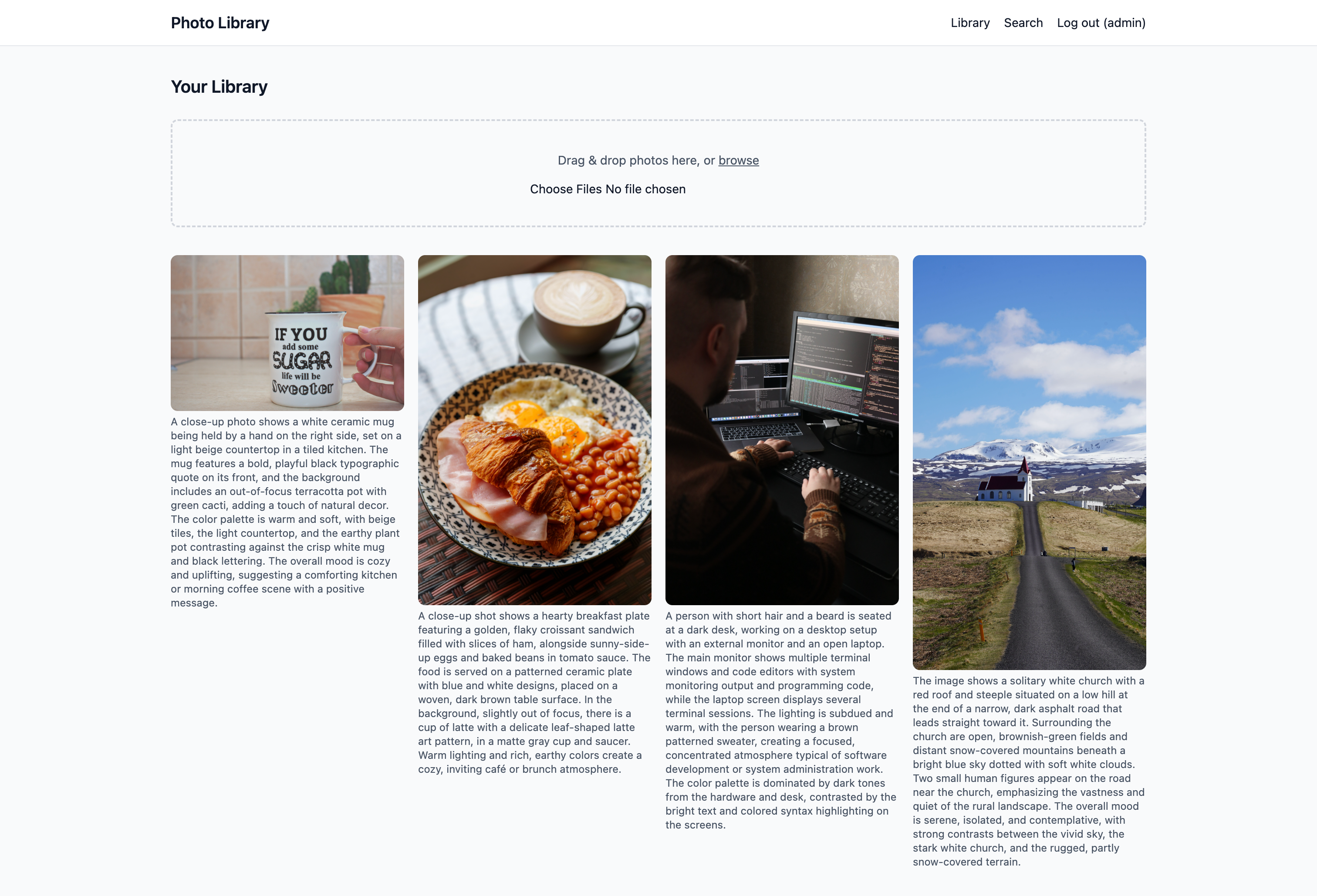
- A real personal library (mug, breakfast plate, developer desk, Icelandic church photos) uploaded and searched by hand throughout
- Codebase
- ~813 lines of Python across 32 modules (5 Django apps), 9 templates, 8 commits
// 01 — The problem
A photo library is useless the moment it outgrows manual tagging.
Filenames are IMG_4821.jpg. Folders are "2024" and "misc." Nobody goes back and labels three years of photos with searchable keywords — so the only path to finding something again is remembering exactly when it was taken, or scrolling.
A model that can look at a photo and describe it changes that completely — but only if the description is actually searchable, and only if "searchable" means something closer to how people actually ask for things.
Four properties of this problem shaped the build:
| Property | Consequence |
|---|---|
| A personal library grows faster than anyone tags it | Manual tagging never keeps pace, so retrieval has to work from the pixels themselves, not from metadata a human never wrote |
| Two different kinds of content live in one photo: the scene, and any text in it | A single scene caption misses signs, screens, labels, and handwriting unless text extraction is a separate, explicit step |
| Search-bar queries are short; AI-written captions are full sentences | A bare keyword embeds nowhere near a descriptive caption even when they mean the same thing, so naive vector search silently misses real matches |
| People ask for photos by time as often as by content | "last month" or "from today" isn't a similarity question at all — it needs a real filter on when the photo was taken, not a fuzzier embedding |
So the goal wasn't "add AI captions to a gallery." It was: make a photo findable the way a person actually thinks about it — what it shows, what it says, and when it happened — without ever requiring a tag a human had to type.
// 02 — Responsibilities and how this was built
This was built solo, directing the product and every design decision, pairing turn-by-turn with Claude Code (Sonnet 5) for implementation. That pairing is part of the story worth being upfront about: two real working sessions in one day, roughly 2.5 hours to take the project from an empty repo to a working end-to-end pipeline (upload → background captioning/OCR/embedding → search by content or date), plus a shorter follow-up session for documentation.
- → Defined the product from a one-paragraph brief: an upload interface plus a chat-style search over AI-generated photo descriptions, backed by Django, Postgres, pgvector, and Docker for local-only development.
- → Made the two load-bearing architecture calls up front: OpenAI (cloud vision + embeddings) over local models for caption quality, and Django templates + htmx + Alpine.js over a React SPA to keep the moving parts to a minimum for a single-user local tool.
- → Locked in a custom Django user model on day one specifically to avoid a painful AUTH_USER_MODEL migration squash later, even though there was exactly one real user.
- → Designed the async pipeline: Celery + Redis so a multi-file upload never blocks on OpenAI network calls, with per-photo status (pending/processing/done/failed) driving both task retry logic and htmx status polling in the UI.
- → Built the vision pipeline: a single structured-output LangChain call that returns both a scene description and a verbatim transcription of any visible text, instead of two separate model calls.
- → Built pgvector-backed retrieval directly through the Django ORM (CosineDistance), deliberately choosing that over LangChain's generic PGVector vectorstore so retrieval could stay a first-class .filter(user=..., status=...) query instead of fighting a metadata-filter API.
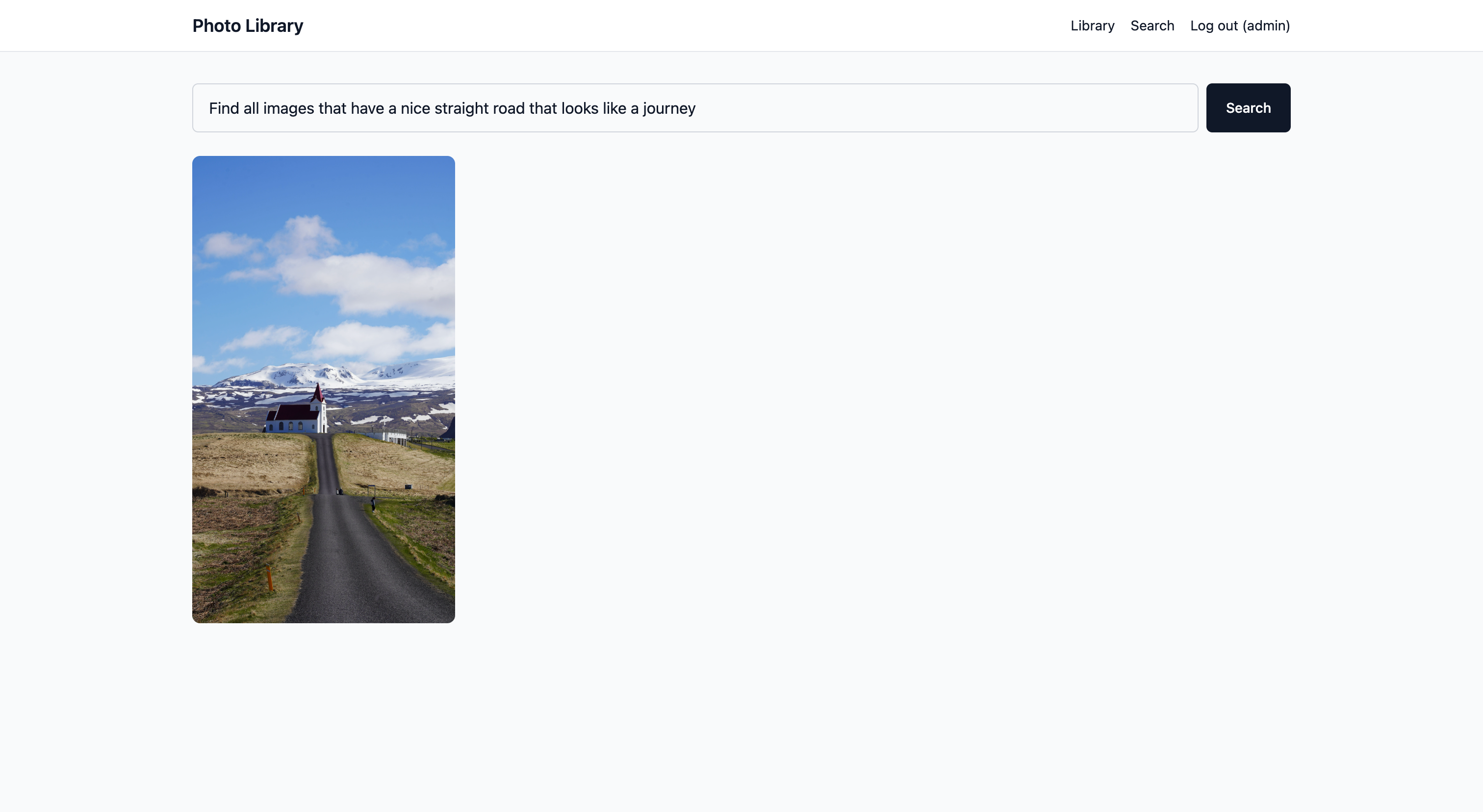
- → Caught and fixed a real retrieval miss: bare-keyword searches ("church") returned zero results against a library that obviously had a church photo, root-caused it to a vocabulary mismatch between short queries and full-sentence captions, and recalibrated the similarity threshold against measured true/false match distances.
- → Cut scope mid-project: recognized that a multi-turn, history-persisting chat interface was solving a problem the product didn't have, and replaced it with a single stateless search page — three fewer models, one simpler mental model for the user.
- → Diagnosed and fixed an oversized image modal that turned out to have two independent root causes stacked on top of each other: incomplete markup, and a stale Vite build the running Django process hadn't picked up.
- → Added OCR-style text extraction (signs, screens, documents, handwriting) to the existing vision call at no added cost or latency, via a Pydantic schema and LangChain's structured-output support, plus a management command to backfill it onto already-uploaded photos.
- → Designed and implemented a deterministic, regex-based natural-language date parser (no LLM call) that recognizes relative windows, fixed periods, and explicit months/years, and combined it with vector search so a query like "church from today" applies both a real date filter and a semantic match.
- → Set up Ruff formatting, a format-on-write Claude Code hook, and a GitHub Actions CI check — then hit and navigated a real GitHub platform limitation (required-status-check enforcement is paywalled for private repos) rather than silently leaving it unresolved.
- → Verified every feature against the live, running app — real OpenAI API calls, real Playwright-driven browser screenshots at multiple viewports, real search queries against real uploaded photos — instead of relying on code review alone.
// 03 — The approach
Seven stages, in the order they actually happened.
Each stage below is one real commit, in sequence. Nothing here is a tidied-up retelling — it's the order the work genuinely happened in, including the parts that got built and then cut.
-
01
Scaffold — Django, Postgres+pgvector, Celery, and the upload pipeline, end to end.
Starting from an empty repo, built six Django apps (config, common, accounts, photos, chat, search — chat was later removed), a custom User model, the Photo model with a pgvector VectorField and HNSW cosine index, per-user media storage, and a Celery task that captions and embeds each photo in the background while the upload request itself stays fast.
-
02
Cut scope — replace multi-turn chat with stateless search.
The original plan modeled chat as Conversation/Message/MessagePhoto with persisted history. Once the scaffold existed, it became clear there was no real multi-turn conversation happening — every query was independent. Deleted all three models and the chat app, and replaced it with a single search page: POST a query, get back a gallery, nothing saved.
-
03
Fix a real UX bug — the image modal, and the two unrelated reasons it was broken.
The lightbox was rendering photos nearly full-screen instead of a bounded modal. Driving the live app with a headless browser (not just reading the template) surfaced two compounding causes: the markup itself was a vertical stack instead of the intended side-by-side layout, and the deployed Tailwind bundle was stale relative to the templates because django-vite caches its manifest once at process start — so even a correct rebuild didn't take effect until the dev server itself was restarted.
-
04
Extract visible text — make what's written in a photo as searchable as what's depicted.
Replaced the single-field caption call with a Pydantic ImageAnalysis schema (description + extracted_text) via LangChain's structured-output support, still one vision API call. The embedded text now includes any transcribed text under a "Text visible in the image" header, so OCR-only queries can find a photo that the scene description alone would never surface.
-
05
Add date-aware search — let a query carry a time window as well as a meaning.
Built a deterministic regex parser for natural-language date phrases ("last month", "this week", "in March 2025", a bare year) with no LLM call involved. It strips the matched phrase out of the query, and if nothing meaningful is left, search skips embedding entirely and returns a plain date-ordered browse — there's no relevance to rank by.
-
06
Harden — formatting, a write-time hook, and CI, including a platform limit.
Added Ruff formatting and lint config, a Claude Code PostToolUse hook that auto-formats any .py file on write/edit, and a GitHub Actions check that fails on unformatted code. Attempting to make that check actually block merges ran into a real wall: GitHub restricts required-status-check enforcement — both classic branch protection and the newer Rulesets API — to paid plans on private repos. Left it as visible pass/fail rather than silently pretending it was enforced.
-
07
Document — README, install/use instructions, a pipeline diagram, and real screenshots.
Wrote a full README (install, usage, a Mermaid flowchart of the upload→processing→search pipeline, and a tooling reference for every pipeline and developer tool), then added real screenshots of the library view and three distinct search behaviors — a keyword match, a pure date browse, and a natural-language semantic match — so the README previews the actual UI instead of only describing it.
photos uploaded
      │
      ▼
[upload view] ──► Photo row created, status = pending  (fast: just a DB write + file save)
      │
      ▼
[Celery: process_photo] ──► status = processing
      │
      ├─► Vision call (LangChain + OpenAI, structured output)
      │      └─► description + extracted_text, in ONE API call
      │
      ▼
   embedding_input = description (+ "Text visible in the image: …" if any)
      │
      ▼
   embed_text() ──► 1536-dim vector, stored on the SAME Photo row (pgvector)
      │
      ▼
   status = done  ──► htmx polling swaps the thumbnail from "Processing…" to the photo

   ─────────────────────────────────────────────────────────────

   search query ──► extract_date_range()  (regex, no LLM)
      │                     │
      │              date phrase found?
      │              ┌──────┴──────┐
      │             yes            no
      │              │              │
      │       filter by        nothing to filter by
      │       created_at            │
      ▼              │              ▼
   anything semantic left after stripping the date phrase?
      │                                   │
     yes                                 no
      │                                   │
      ▼                                   ▼
embed("A photo of {query}.")      return date-ordered
      │                            browse, newest first
      ▼
CosineDistance over pgvector,
filtered at 0.65, top 12
      │
      ▼
   ranked gallery results
What's per-user vs. shared by every user
| Per-user | Shared by every user |
|---|---|
| Media folder (media/user_<id>/…) | Vision captioning + text-extraction pipeline |
| Library view and upload form | Embedding model and vector dimensions |
| Search results (query always scoped to request.user) | Similarity threshold and date-parsing rules |
| Account/session (custom User model, login/signup) | Celery task logic, retry/backoff policy, status state machine |
// 04 — Technical insights
Two retrieval arms, combined: meaning and time are different questions
Semantic search alone can't answer "last month." A date filter alone can't answer "church." The retrieval layer treats these as two independent arms that get applied in sequence, not fused into one score.
| Arm | Finds | Misses |
|---|---|---|
| Semantic vector search (pgvector cosine distance) | Visual content, subjects, mood, paraphrase ("a dog on a beach" matches a caption that never uses the word beach) | Anything about *when* a photo was taken — it has no concept of time at all |
| Date-range regex filter (search/dates.py) | Exact time windows: today, this/last week, this/last month, a named month, a bare year, "last N days/weeks/months" | Anything about what's actually in the photo — it only ever looks at created_at |
retrieve_photos() pulls the date phrase out of the query first, filters the Photo queryset by it, and then decides whether anything semantic is left to embed and rank. "Church from today" runs both at once — an exact date filter and a semantic match — while "photos from last month" skips semantic search entirely and returns everything from that window newest-first instead.
The date parser is deliberately conservative where it's ambiguous. A bare month name floating in a sentence doesn't get treated as a date reference unless it has a leading preposition ("in march") or an attached year ("march 2025") — a bare month word is too easy to get wrong, especially "may," which is also a common modal verb ("I may go to the park" must not become a May date query).
| Retrieval parameter | Value | Reasoning |
|---|---|---|
| TOP_K | 12 | Enough results to browse as a gallery without flooding it with marginal matches |
| DATE_BROWSE_LIMIT | 60 | A pure date query ("photos from last month") has no relevance score to rank by — the point is to see everything from that window, so the cap is generous, not tight |
| MAX_DISTANCE | 0.65 (cosine) | Calibrated against real true/false match distances after the query-reframing fix below — sits in the measured gap between genuine and unrelated matches |
| MAX_UPLOAD_SIZE | 15 MB | Generous for phone photos, cheap enough as a validation check to reject obvious mistakes before they reach Celery |
| Embedding dimensions | 1536 (text-embedding-3-small) | Negligible storage at personal-library scale (~6KB/photo); no need for the API's dimension-truncation option |
A bare keyword and a full sentence are different genres of text
This is the single most important bug this project found, because it was silent: searching the literal word "church" against a library that had an obvious, clearly-described church photo returned zero results. Nothing errored. The search page just showed "no matching photos," confidently and incorrectly.
| Difference | Observed | Effect |
|---|---|---|
| Query length vs. caption length | A search-bar query like "church" is one token; a real caption reads "The image shows a solitary white church with a red roof and steeple situated on a low hill…" | The query vector and the caption vector describe different things — a bare noun vs. a whole described scene — and land far apart even when they mean the same subject |
| Captions always open with scene-setting framing | Every AI-written caption in this project begins "A photo shows…" / "A close-up shot shows…" or similar | A bare keyword query never carries that framing, so it's missing exactly the words that anchor where captions sit in vector space |
| The fix | Wrap the query as "A photo of {query}." before embedding — bringing it into the same descriptive phrasing style as the captions | Recalibrated against the real library: true matches clustered 0.43–0.58 cosine distance, false matches clustered 0.70–0.79 — a clean gap, threshold set at 0.65 |
The fix wasn't a bigger embedding model or a looser threshold. It was recognizing that the query and the thing it's being compared against need to be written in the same register before a distance between them means anything.
Keep the embedding on the row, not in a separate system
There's no standalone vector database here. A photo's embedding is a VectorField column on the same Photo row as its description, status, and extracted text.
| Benefit | Detail |
|---|---|
| One row is one source of truth | A photo's embedding lives in a VectorField directly on the Photo row — not in a separate vector store — so description, extracted_text, status, and embedding are all written in a single save() call |
| Two ordinary indexes, no second system | An HnswIndex (cosine ops) for similarity search and a plain models.Index(user, status) for cheap scoping — both live in the same Postgres instance as everything else |
| Celery/Redis is purely a queue, never a store | Nothing about a photo's searchable state lives in Redis; if it were flushed, nothing is lost except in-flight task messages — the Photo row is always authoritative |
| Status is just a column | pending/processing/done/failed drives both the background task's retry state machine and the UI's polling loop (hx-trigger="every 3s") off one CharField — no separate job-tracking table |
A visible bug can have two causes stacked on top of each other
The oversized modal looked like a CSS problem. Fixing the template's layout classes alone would have looked correct in a code review — and still rendered wrong in the browser, because the deployed CSS bundle was stale. django-vite parses and caches its manifest once when the Django process starts; rebuilding the frontend after editing a template doesn't help until the already-running server process is restarted. Only driving the real, running app with a headless browser — screenshotting it at a desktop and a mobile viewport — surfaced that the fix needed two separate actions, not one.
Structured output turns one API call into two features
Extracting visible text could have meant a second model call per photo — double the cost, double the latency. Instead, analyze_image() uses LangChain's with_structured_output() against a two-field Pydantic schema (ImageAnalysis: description, extracted_text) in the same vision call that already existed. Reprocessing a photo of a developer's desk, the model correctly transcribed real, plausible on-screen text, and searching those exact phrases — none of which relate to the scene description at all — returned that photo and only that photo, with existing scene-based searches unaffected.
// 05 — Results
It finds a photo by what it shows, what it says, or when it happened.
| Measure | Result |
|---|---|
| Bare-keyword search returning zero results ("church" against a library that had one) | Fixed — query reframing before embedding plus a recalibrated 0.65 cosine-distance threshold, verified against real true/false match distance clustering |
| Oversized, unconstrained image modal | Fixed — responsive side-by-side layout, plus the actual root cause (stale django-vite manifest cache), verified with Playwright screenshots at a 1280×900 desktop and a 390×844 mobile viewport |
| Text visible inside photos (signs, screens, labels) was invisible to search | Fixed — single structured vision call now returns description and extracted_text together; backfilled onto existing photos and confirmed OCR-only queries ("systemd", "htop process list") returned the correct photo with zero cross-contamination against unrelated scene-based searches |
| No way to search by time | Fixed — deterministic date-range parser combined with semantic search; verified against 18 phrases covering every supported pattern plus adversarial cases, and against the real library |
| Code style drift risk | Mitigated — Ruff format/lint config, a write-time auto-format hook, and a CI check that fails on unformatted code |
| Merge-time enforcement of that CI check | Partial, by design — GitHub paywalls required-status-check enforcement for private repos below its paid tiers; left as a visible, honest pass/fail rather than a false sense of a blocked merge |
| Automated test suite | None yet — every change was instead verified live: real OpenAI API calls, real Playwright-driven browser screenshots, hand-checked date math against the real current date, and real search queries against real uploaded photos |
| Codebase size | 813 lines of Python excluding migrations (915 including them) across 32 files, 9 templates (226 lines of HTML), 5 Django apps, 8 commits |
Qualitatively, what distinguishes this from a generic "upload and caption" gallery:
- It finds a photo by a single bare keyword as reliably as by a full descriptive sentence, because the query is reframed to match how captions are actually written before either is embedded.
- It separates "what's depicted" from "what's written" — a photo with no visually interesting content but a lot of on-screen text is just as findable as a scenic one.
- It understands time without ever calling a model for it — "last month," "this week," and "October 2026" are all handled by a few hundred lines of regex, for free.
- It combines both: "church from today" is a real date filter and a real semantic match, applied together in one query.
- Every photo card shows its own real-time status (pending → processing → done/failed) via lightweight polling, with no websocket infrastructure.
Calibration evidence for the similarity threshold
| Query type | Closest cosine distance |
|---|---|
| True match (bare keyword, after query reframing) | 0.43 – 0.58 |
| False / unrelated match | 0.70 – 0.79 |
| Threshold set | 0.65 (sits in the measured gap) |
// 06 — What I learned
A chat interface was the wrong shape for a search problem.
A chat interface was the wrong shape for a search problem.
The original plan modeled multi-turn conversation history because that's what a "chat with your photos" product sounds like it needs. In practice every query was independent — nothing carried over from one search to the next. Recognizing that after the scaffold already worked, and cutting three models and an entire app for it, was a better outcome than defending the original plan out of sunk cost.
Vector search has a vocabulary mismatch problem, not just a quality problem.
A bare keyword and a full-sentence AI caption are different genres of text even when they mean the same thing. "church" and "A photo shows a solitary white church on a hill…" describe the same subject but embed far apart. The fix wasn't a bigger model or a lower threshold — it was making the query's phrasing match the caption's phrasing before embedding either one.
A visible bug can have two causes stacked on top of each other.
Fixing the modal's markup alone would have looked correct in a code review and still rendered wrong in the browser, because the actual deployed CSS was stale — django-vite caches its manifest once at process start, so a rebuilt bundle silently doesn't take effect until the server itself restarts. Only driving the real, running app with a headless browser surfaced both causes.
Verify by driving the real app, not by reading the diff.
Every feature in this project was confirmed against a live OpenAI call, a live Playwright screenshot, or a real query against real uploaded photos — not just a passing code review. That discipline also caught a bug in a verification script itself: an ambiguous button selector (button[type="submit"]) matched the nav bar's logout button before the search form's submit button, silently logging the test session out instead of searching. Correctly identifying that as a test-script bug rather than an app bug, instead of chasing a phantom regression, mattered as much as the fix itself.
Deterministic code beats a model call when the input space is enumerable.
Natural-language dates — "last month," "this week," "in March 2025" — don't need an LLM. A regex parser handles them for free, instantly, and testably, including naming the specific ambiguous cases worth guarding against in code: a bare month name floating in a sentence is too ambiguous to assume (especially "may," also a common modal verb), so it requires either a leading preposition or an attached year before it's treated as a date.
A platform limitation isn't something to route around quietly.
GitHub blocks required-status-check enforcement for private repos below its paid tiers — confirmed by hitting the same paid-plan error from both the classic branch protection API and the newer Rulesets API. Rather than silently leaving the CI check toothless or upgrading billing without asking, the gap was surfaced directly as a real, informed trade-off: the check still runs and reports pass/fail on every push and PR, it just can't technically block a merge yet.
No automated tests is a real gap, not a stylistic choice.
This project leaned entirely on live, manual, hands-on verification — real API calls, real browser screenshots, real data. That worked for a focused single-day build, but it doesn't scale past this point, and it's the most obvious next investment rather than something to quietly leave unaddressed.
// Technologies used
| Layer | Technology | Why it was chosen |
|---|---|---|
| Language / framework | Python 3.12, Django 5.2 | ORM, admin, auth, and migrations for free; a custom User model locked in on day one to avoid a later AUTH_USER_MODEL migration squash |
| Database | PostgreSQL + pgvector | One store for photo metadata, status, and the similarity-search index — no separate vector database to keep in sync |
| Vector search | pgvector — HnswIndex, vector_cosine_ops, 1536 dimensions | Matches text-embedding-3-small's native output size; an ordinary Postgres index, not a second system |
| Async processing | Celery + Redis | Captioning and embedding are network-bound OpenAI calls (~1–5s combined); keeps multi-file uploads from blocking on them, with retry/backoff on transient API errors |
| Vision + embeddings | LangChain (langchain-openai) + OpenAI — gpt-5.1 (vision, structured output) and text-embedding-3-small | with_structured_output() turns one vision call into a typed (description, extracted_text) pair instead of two separate calls or fragile text parsing; model names are plain env config since OpenAI's lineup shifts over time |
| Retrieval | Django ORM + pgvector's CosineDistance, directly — not LangChain's PGVector vectorstore | Retrieval needs a tight, first-class join against Django-owned metadata (user, status); a generic vectorstore's metadata-filter API would be fighting the tool for something the ORM already does well |
| Date parsing | Hand-rolled regex parser (search/dates.py) — no LLM call | The input space (relative windows, fixed periods, explicit months/years) is fully enumerable; deterministic, free, instant, and testable beats a model call for this |
| Frontend | Django templates + htmx + Alpine.js, Tailwind CSS v4 via Vite | Server-rendered views with htmx-driven partial swaps and Alpine for the modal — a React SPA plus a DRF API would have added CORS, auth tokens, and two dev servers for no real benefit at this scale |
| Infra / tooling | Docker Compose (db, redis, web, celery_worker), Ruff, a Claude Code format-on-write hook, GitHub Actions CI | One-command local environment; formatting enforced both at write-time and at CI-time so style can't silently drift |
// Appendix — project at a glance
| Metric | Value |
|---|---|
| Django apps | 5 (accounts, common, config, photos, search — chat was built, then removed) |
| Python files / lines (excl. migrations) | 32 files / 813 lines |
| Python files / lines (incl. migrations) | all files / 915 lines |
| Templates / HTML lines | 9 / 226 |
| Commits | 8 |
| Unique files touched across history | 79 |
| Embedding model / dimensions | text-embedding-3-small / 1536 (halfvec not needed at this scale) |
| Vision model | gpt-5.1 (OPENAI_VISION_MODEL, env-configurable by design) |
| Similarity threshold (cosine distance) | 0.65, calibrated against real true/false match distances |
| Date phrases covered | today, yesterday, this/last week, this/last month, this/last year, last/past N days/weeks/months, named month ± year, bare 4-digit year |
| Celery retry policy | 3 attempts, exponential backoff + jitter, on RateLimitError/APITimeoutError/APIConnectionError |
| Max upload size | 15 MB per photo |
| Automated tests | 0 — verification was entirely live/manual (see "What I learned") |
| Build time | ~2.5 hours for the full working application (scaffold through date search and CI hardening), plus a shorter documentation pass, both in a single day |